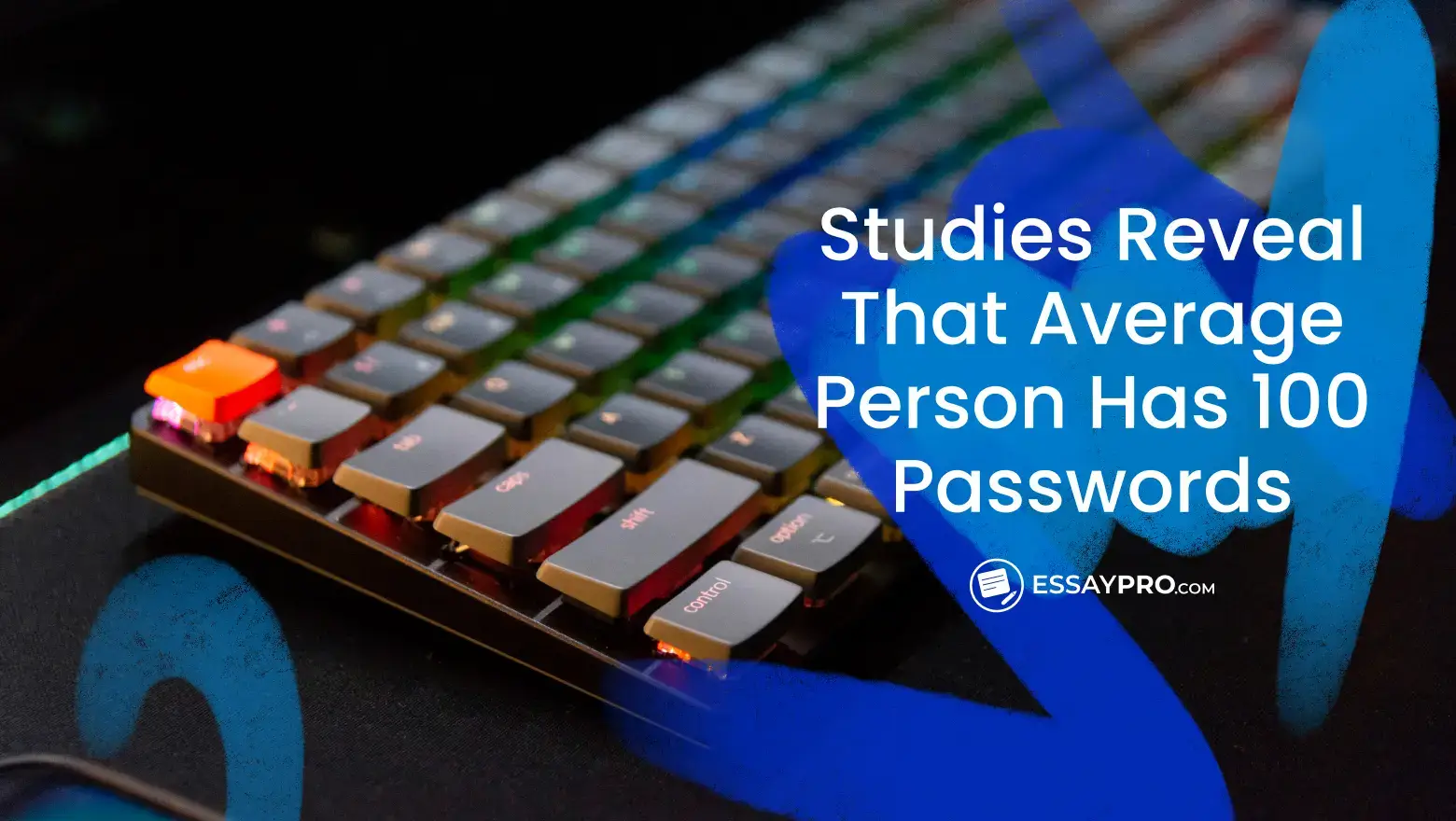
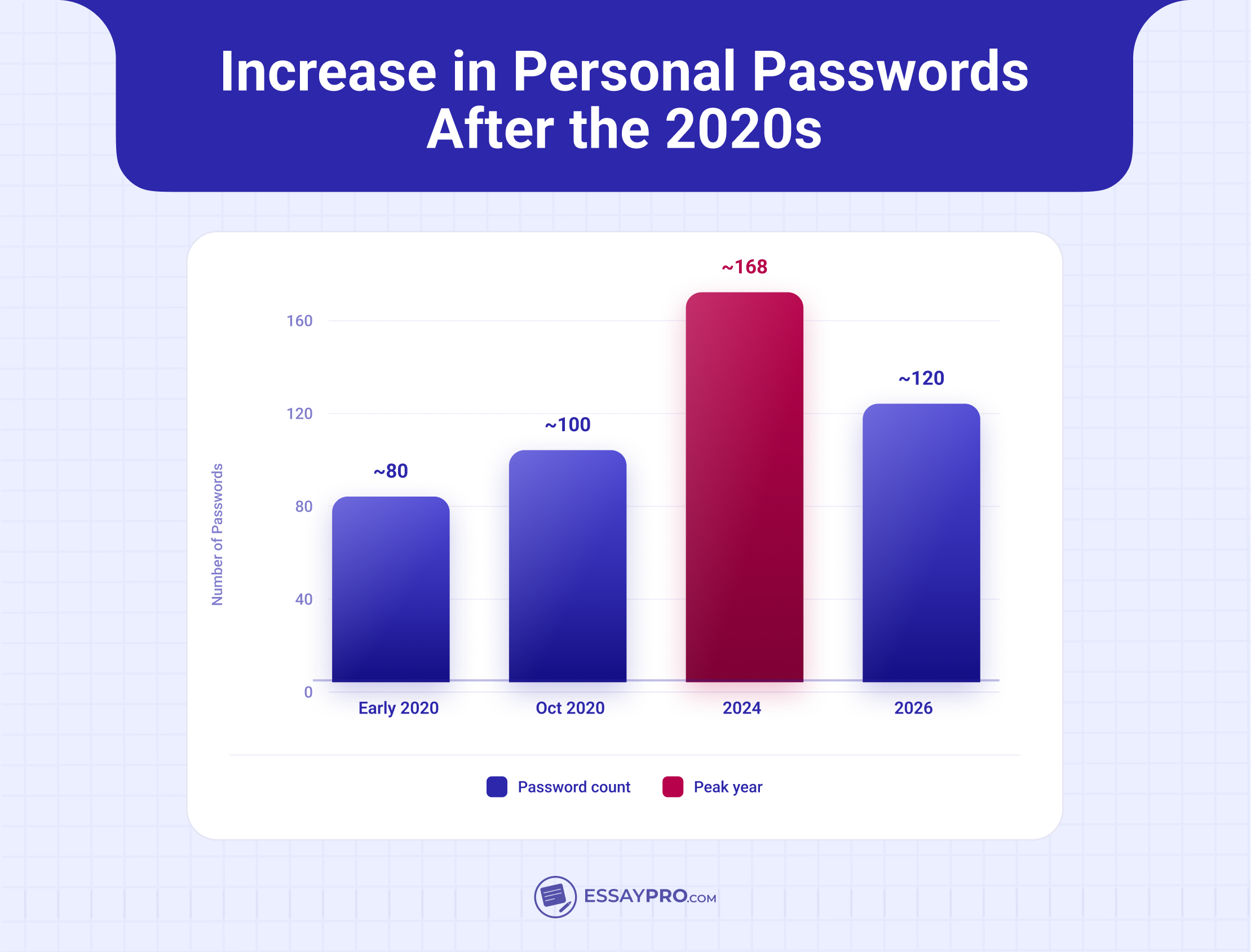
By the year 2024, according to NordPass, the average number of passwords per person had peaked at 168, which is still an all-time high. Even the average 100 passwords seemed like it was undercounting what most people actually accumulate, and the 168 is even more staggering.
Audit one normal week, and you’ll find out just how fast streaming platforms, three or four banking and payment apps, the AI tools you tried once and never deleted, remote-work logins, and every smart device that demands its own account add up. They truly pile up faster than you can track. So, the natural progression demanded that password management turn into an actively pressing concern, because cybercriminals now lean on AI to run phishing and credential attacks at a scale that older habits were never built to survive.
How Many Passwords Should the Average Person Remember?
So what is the real number? NordPass has run this survey repeatedly. Here is the trajectory:
Those figures come straight from NordPass's repeated surveys. The direction is obvious enough. A decade back, a typical adult had maybe a dozen logins, and now the same person deals with well over a hundred across personal accounts, work systems, and entertainment platforms they forgot they signed up for. Gen Z pushes the count higher, since 99% of them own or can reach a smartphone, and each new app means one more account.
That volume of anything, including passwords, would be enough to overwhelm, which is why password fatigue has become a thing - a genuine mental exhaustion that sets in when you’re, once again, asked to invent and recall even more distinct credentials. You probably don’t need to have a separate reason for repetition laid out in front of you because it’s that obvious that human memory has limits. Around 62% of Americans admit they often or always repeat a password, because remembering fewer feels easier.
What Makes a Good Password?
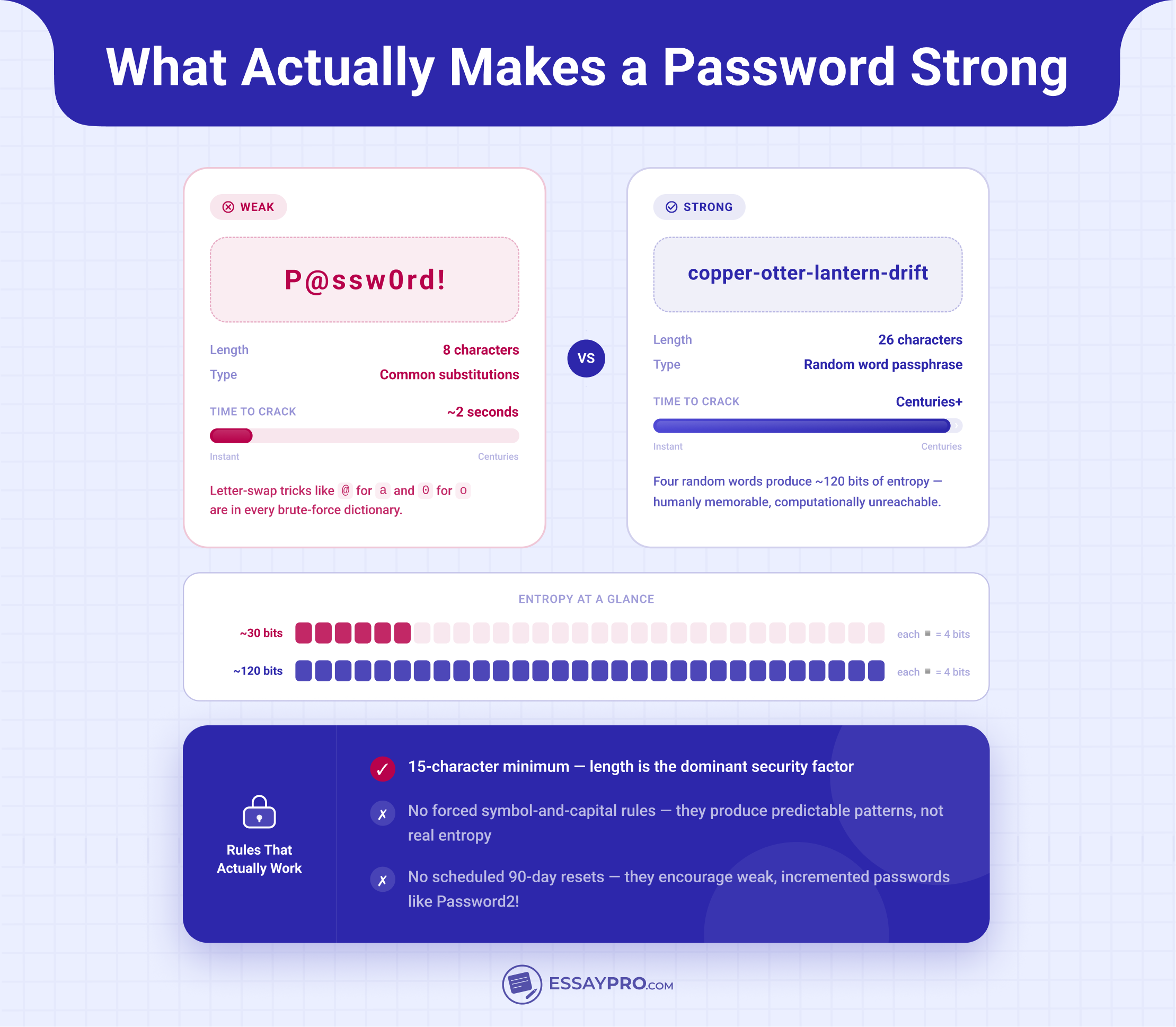
A good password in 2026 comes down to length and unpredictability, full stop. NIST, the reference body most policies copy, sets the current bar in SP 800-63B (Revision 4): 15 characters as the minimum for a standalone password, no mandatory symbol-and-capital combinations, and no scheduled 90-day resets. The logic rests on password entropy, the mathematical measure of how unpredictable a password is, and adding length raises it sharply.
Two things follow:
- A passphrase of four or five unrelated words reaches high entropy and stays memorable.
- A password generator builds a string no human would guess, and a manager holds it.
Even a perfect password will not protect you alone for the following reasons:
- AI-assisted phishing writes flawless, targeted lures at scale.
- Credential stuffing feeds one leaked password into hundreds of pages automatically.
- Infostealer malware lifts saved logins off an infected machine. Flashpoint logged 1.8 billion stolen credentials in 2025, and stolen logins turn up in 86% of breaches.
Enter the passkey, which replaces the typed password with a cryptographic key stored on your device and unlocked with your fingerprint. Google already runs 800 million passkey accounts. Add multi-factor authentication plus breach monitoring, and you cover what a password alone never could.
Password Best Practices
Knowing the numbers won’t protect your accounts unless you act on that knowledge. The practices on how to make a good password below are what security teams agree on today: one unique password per account, long passphrases, no guessable personal details, updates triggered by real events instead of a fixed calendar, a password manager to handle storage, and multi-factor authentication on top.
Have a Different Password for Every Account
Password reuse is the one habit that turns a small breach into a big one. A site gets breached, and the leaked email-and-password pairs end up sold or dumped in public. Attackers then run credential stuffing, which means automated tools test those same pairs against banking, email, and shopping logins at machine speed. One match gets them into another account. Reuse the same password across ten sites, and a single leak can open all ten. This breach-chain effect is the reason unique credentials outrank every other rule here.
Use Long, Secure Passphrases
Aim for a minimum of 16 to 20 characters for the passphrases. Length beats complexity for a simple reason that each extra character multiplies the guesses an attacker needs, while swapping 'a' for '@' only adds a predictable trick that cracking tools already expect. 'P@ssw0rd!' has eight characters and falls in seconds. ‘'Copper-otter-lantern-drift' clears 20 characters and holds for years, and you can still remember it. For logins you never type by hand, let a password generator create a random string and store it in the manager.
Avoid Sensitive and Guessable Information
Social media hands attackers plenty. A determined one will read your public posts, note your dog's name, your team, your kid's birth year, then feed those guesses into cracking tools first. Skip anything tied to your real life. The answer to the question, ‘What’s a good password?’ is never any of these:
- Birthdays and anniversaries
- Family and pet names
- Your favorite sports team
- Keyboard runs like 'qwerty' or '123456'
- Plain dictionary words
- Anything you've posted publicly
Regularly Update Your Passwords
The old advice to change every password every 90 days is finished, and NIST officially retired scheduled rotation, since forcing regular changes just pushes people toward predictable, incremental passwords. 'Spring2024' becomes 'Spring2025', and nothing improves. The SP 800-63B, Revision 4 says change a password only when there's a real reason, including:
- The account or service was breached
- Your credentials appear in a known data breach
- You spot suspicious login activity
- You realize you reused that password elsewhere
Use a Password Manager
Memory fails past a few dozen accounts when you can no longer come up with whats a good password, and a password manager is the practical answer. One master password unlocks an encrypted vault that does the rest:
- Generates a unique, random password for each account
- Stores everything with strong encryption
- Autofills logins so you never retype
- Shares credentials securely with family or coworkers
- Monitors breach databases and alerts you when a saved password leaks
- Syncs across your phone, laptop, and tablet
Use Two-Step Authentication
Multi-factor authentication (MFA) requires a second proof of identity beyond your password, so a stolen password alone gets an attacker nowhere. Match the method to the account:
How to Remember All Your Passwords?
Nobody actually remembers 120 passwords; anyone who claims to is reusing a handful. That's the trap. Once you accept that memory was never going to scale, the answer is a division of labor across a few tools, each with one job:
One recommendation from experience: print your recovery key and keep the paper somewhere physical, because a recovery key saved inside the very vault it unlocks helps nobody. And skip the three tempting shortcuts, browsers, sticky notes, and spreadsheets. Browser-stored passwords fall to any infostealer that reaches your machine; notes and spreadsheets stay unencrypted, so one synced file can spill the lot.
Should I Use a Password Manager?
For almost everyone, the answer is yes, and it comes down to arithmetic. People who use a manager report identity theft at 17%, versus 32% for those who don't, roughly half the exposure from a tool that's free on most platforms. A manager is no cure-all, though, and a few details decide how well it works for you.
What you gain:
- Unique, generated passwords on every account, with no searching for what are good password ideas
- Time back, since autofill retires the reset-and-retype routine
- One vault, synced across your phone, laptop, and tablet
What deserves your attention:
- Pick a provider with an independent, published security audit and zero-knowledge encryption, so even the company can't read your vault
- Treat the master password as the single point of failure it is. Get that one password right, and its protection, and a manager removes far more risk than it adds.
- Switch on MFA for the vault itself
- Keep passkeys in the same vault, since most managers now store both
Password Security Trends in 2026
A few bigger patterns explain why 2026 looks the way it does in terms of password security:
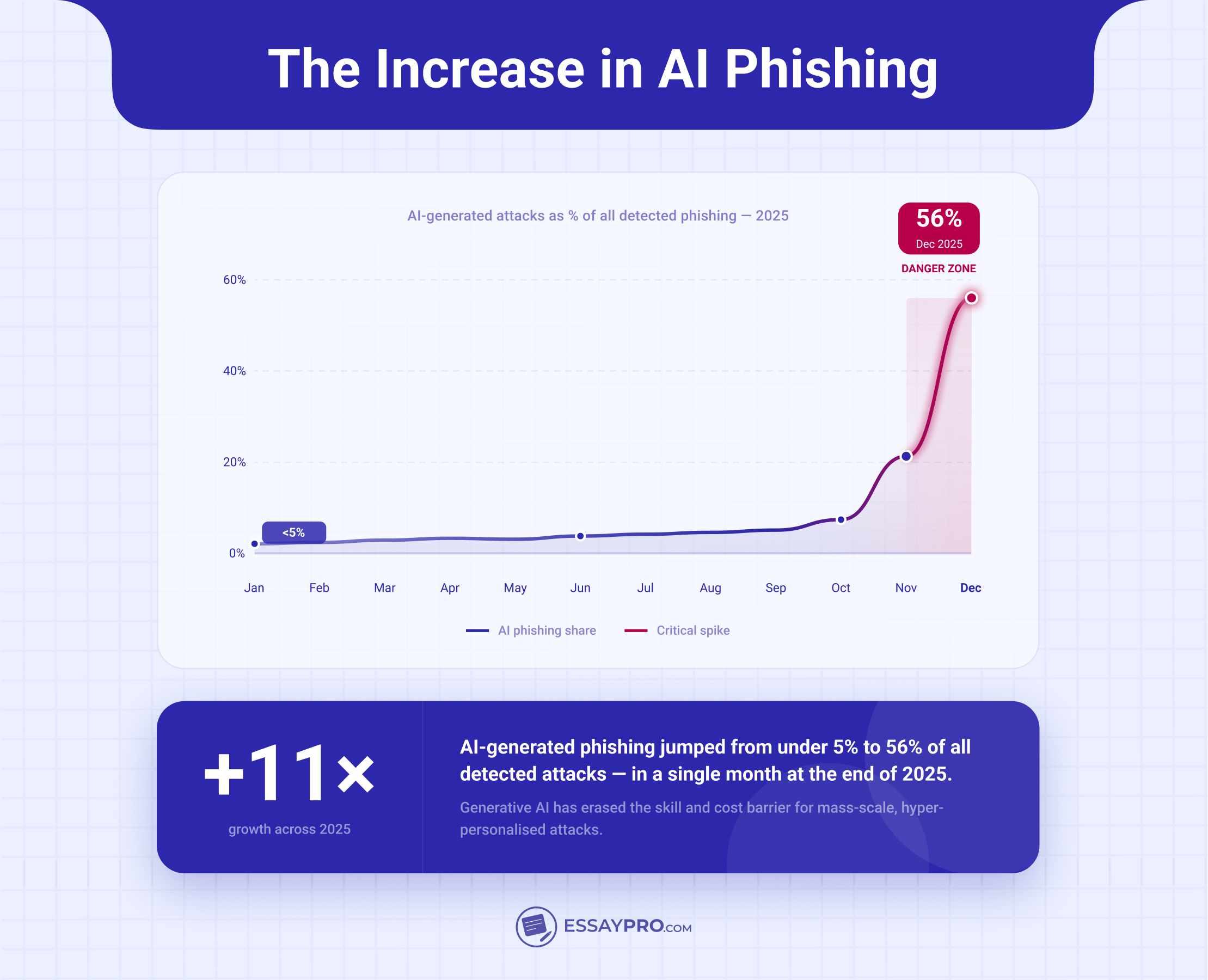
- Hoxhunt watched AI-generated phishing leap fourteenfold at the end of 2025, from under 5% of detected attacks to 56% in one month.
- Infostealer malware became the dominant source of stolen credentials. Flashpoint logged 1.8 billion stolen credentials in 2025; stolen logins now surface in 86% of breaches
- Credential stuffing stays profitable because people keep reusing. Analysts found 94% of leaked passwords were reused or duplicated.
- Passkeys finally hit ordinary users. Dashlane clocked passkey logins doubling to 1.3 million a month, with 40% of users now holding at least one.
- Browser-based managers became the default nobody chose on purpose. Because Google and Apple bundle them in, about 79% of manager users pay nothing.
- Gen Z adopts fastest and slips hardest. They lead manager adoption at 46%, yet 72% still admit to reusing passwords.
- Passwordless login is the slow, near-certain direction. Gartner expected more than half of workforce logins to go passwordless by 2025, and the market behind it hit $24.1 billion.
Watch where the money and the malware both point, and the next few years write themselves. Once AI phishing and infostealers have hollowed out the worth of anything you type, a password stops being a lock and becomes a liability, which is exactly why new accounts will start arriving with a passkey already set up. The two lines cross somewhere soon, passwordless logins pulling ahead of password ones for regular people. And the thing holding that up won't be the tech, which is ready. It'll be the habits, Gen Z reusing credentials on the very devices built to make reuse pointless.
FAQs

Are Passwords Becoming Obsolete?
Are Passkeys Safer than Passwords?
How Many Online Accounts Does Gen Z Typically Have?
Is Using Google or Apple Sign-In Safer than Creating Passwords?
Do I Still Need a Password Manager if I Use Passkeys?

Ana Ratishvili
Ana is a professional literary writer with a Master’s Degree in English literature. Through critical analysis and an understanding of storytelling techniques, she can craft insightful guides on how to write literary analysis essays and their structures so students can improve their writing skills.